
How to Install Free SSL on cPanel Hosting (v134.0.13)
Website security is one of the most important aspects that should never be ignored. To support this, all hosting services now include a free SSL feature. This article explains what SSL is and how to install free SSL on cPanel hosting instantly.
What Is SSL?
Secure Socket Layer (SSL) is a security technology that creates an encrypted connection between a web server and a web browser. In simple terms, the server and browser work together to connect a user’s computer with your website securely.
With SSL, your site is protected from hacking attempts such as data interception aimed at stealing information transmitted between the user’s computer and the server. Without this protection, attackers with access to routers or ISPs could spy on user activity or inject malware into your site.
About Free SSL
The free SSL feature uses Let’s Encrypt, a certificate authority that provides free SSL/TLS certificates to improve global website security.
- Validity: 90 days
- Auto-renewal: Automatically renewed as long as your domain points to the hosting server and your hosting account isn’t over quota. This ensures your site remains protected from threats like Man-in-the-Middle attacks.
Installing Free SSL on cPanel
All hosting services now support free SSL. On Shared Hosting, Unlimited Hosting, and Cloud Hosting, SSL activates automatically — no manual installation needed.
However, if AutoSSL fails, you may need to install it manually. Common causes include:
- Domain validation failed
- Domain not pointed to hosting nameservers
- Domain not directed to the hosting IP
Solution: Point your domain’s nameservers or IP to the hosting server, then follow these steps.
Steps for New cPanel Version (v134.0.13)
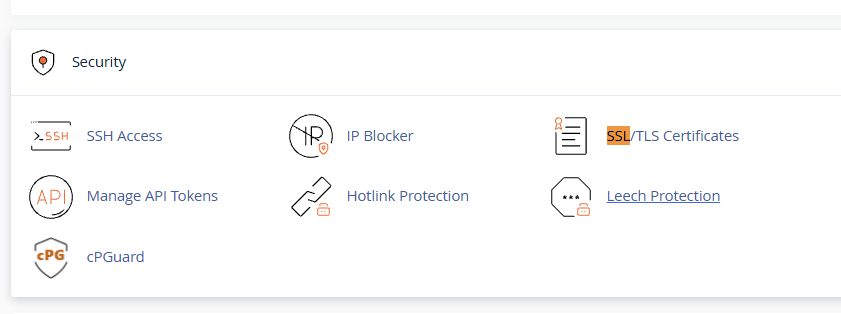
- Log in to your cPanel account.
- Click SSL/TLS Certificates.
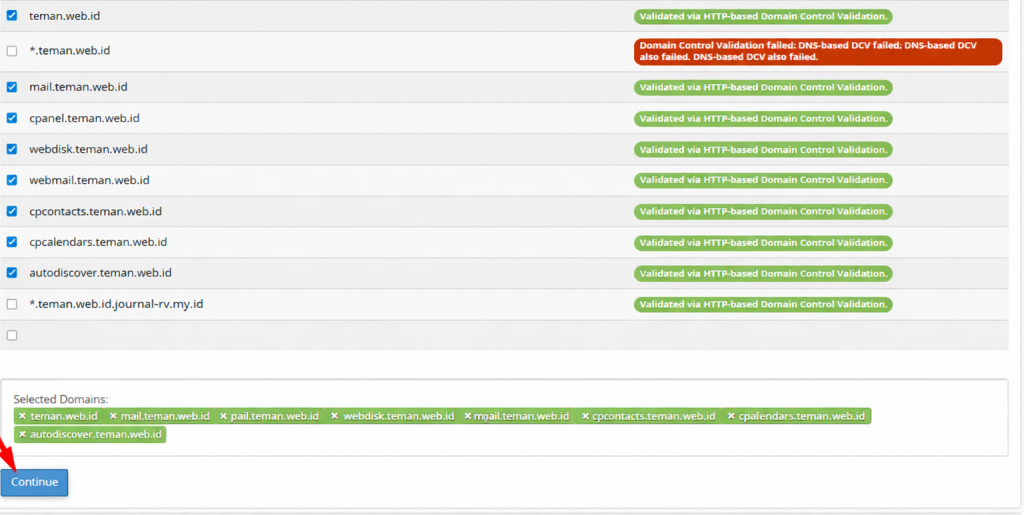
- In the wizard, check the domains you want to secure.
- Verify domain validation — ensure it shows green status.
- Click Continue.
- Select Let’s Encrypt Certificate, agree to the Terms of Service, and click Continue.
- Wait for installation to complete.
- Successful domains will display a green padlock icon.
Testing SSL
Access your domain via HTTPS. If the site loads successfully, SSL is installed correctly.
Installing free SSL on cPanel is an essential step to secure your website and build visitor trust. With AutoSSL from Let’s Encrypt, the process is simple and often automatic.
If validation fails or your domain was recently redirected, manual installation ensures your site remains secure and accessible via HTTPS.
By following these steps, you can keep your website protected and maintain a professional, trustworthy online presence.